LR Smart Metatagger
Keywording that never leaves your machine.
A Lightroom Classic plugin that writes keywords, titles, and captions using a vision model running locally. Built for catalogs too large — or too private — to upload.
| Stack | Lua · Python · Lightroom SDK · Ollama |
|---|---|
| Role | Software Developer |
| Year | August 2025 – Present |
| Status | Open source |
Overview
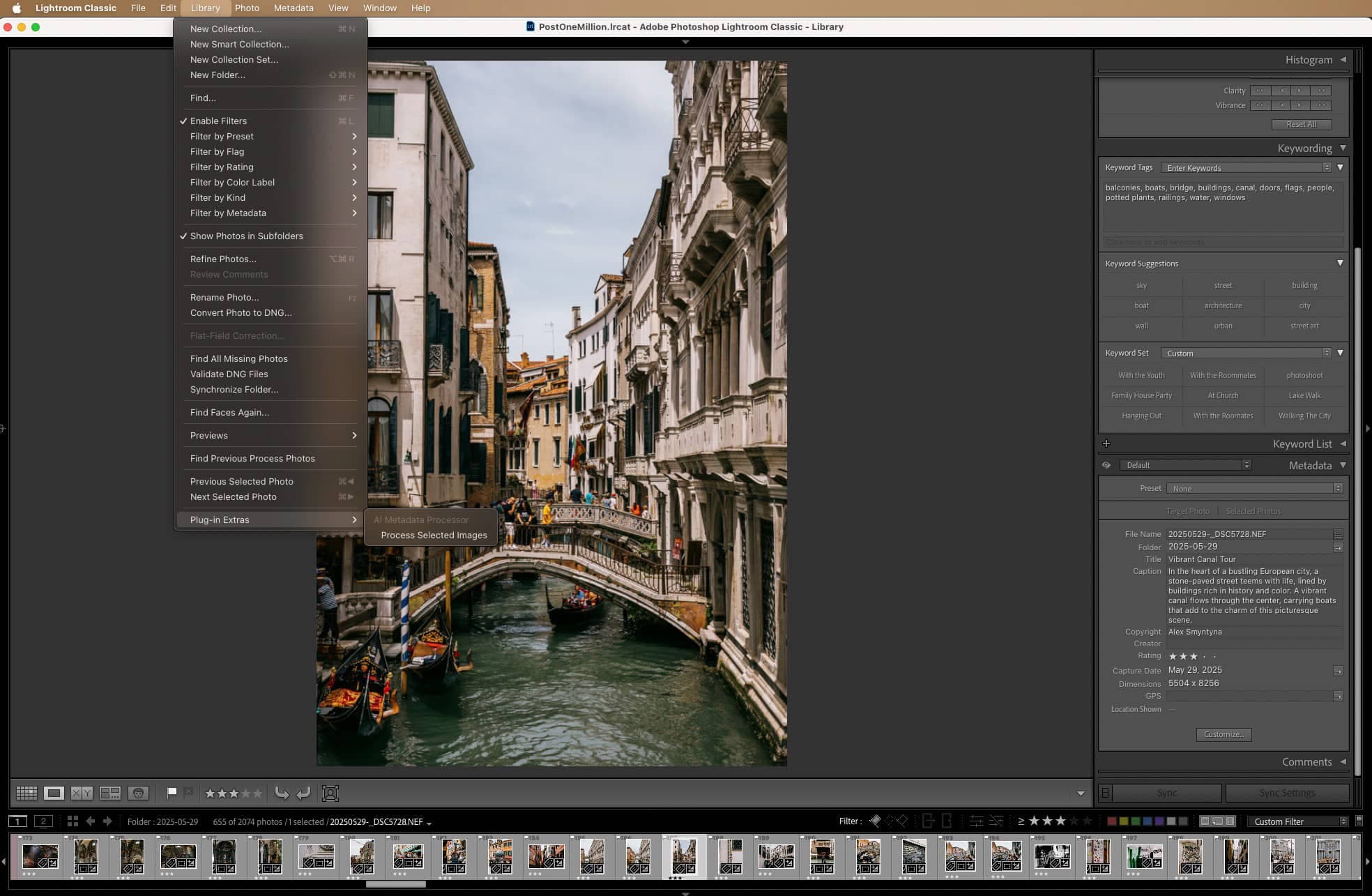
An unkeyworded photo library is an unsearchable one, and keywording by hand does not scale past a few thousand images. LR Smart Metatagger selects a batch in Lightroom Classic and writes keywords, a title, and a caption into the catalog for every photo, using a vision model running on the same machine. There is no API key, no per-image cost, and no upload. It ships as a Lightroom plugin for working inside a catalog, and as a standalone CLI for processing folders of RAW files without opening Lightroom at all.
Why it runs locally
Metadata is the workload that makes a hosted API absurd. A library in the hundreds of thousands of images means that many vision requests, and the arithmetic stops being a rounding error very quickly. Running the model on the same machine as the catalog turns an unbounded bill into electricity.
The privacy argument is the same argument. These are your photographs, frequently your clients'. Nothing leaves the disk they were imported to, and after the model is downloaded the whole pipeline works with the network off.
Two ways in
The Lightroom plugin is for working inside a catalog: select photos, choose what to generate, and watch a progress bar while metadata lands on them. First run installs its own Python environment, so nothing has to be set up from a terminal.
The CLI is for bulk. Point it at a folder or a tree of folders of RAWs and it extracts previews, runs them through the model in parallel, and keeps a resumable log per folder so an interrupted run costs nothing.
Measuring which model is actually fast
The project includes a benchmark harness, because the intuitive answer is wrong. Across seven vision models on an M4 Max, six spent more time reading the image and prompt than writing the answer, and one spent six times longer reading than writing.
That ratio, not the parameter count in the model's name, is what decides throughput for this job. The smallest model tested was not the fastest: a 4B model took 8.62 seconds per image against a 7B model's 3.34. The harness reports both halves separately so the choice can be made on measurement rather than on the label.
Technical
Lua plugin against the Lightroom Classic SDK, reading the selection and writing back inside a catalog write transaction. Keywords go through createKeyword and addKeyword; titles and captions through setRawMetadata.
Lua talks to Python over a stdout-JSON bridge, with a managed virtualenv provisioned on first run and cached afterwards.
Previews are extracted from RAW with rawpy, with RawTherapee and dcraw as fallbacks, then downsized before inference — the model never needs the full-resolution file.
Prompts are built per task so the model returns parseable keywords, a single-line title, and a caption, rather than freeform prose that then has to be salvaged.
Key Features
Writes keywords, titles, and captions straight into the Lightroom catalog.
Runs entirely on your own hardware — no account, no API key, no per-image cost.
Reads RAW directly: NEF, CR2, CR3, ARW, DNG, RAF and more.
Resumable — stop mid-run on a hundred thousand images and pick up where it left off.
Swap models to trade speed against quality; roughly 18 images a minute on an M4 Max.
Includes a benchmark harness for measuring models on your own machine.
Gallery
01 / 02Next
Interested in this project?
Look at the live build, or get in touch about something similar.